
How to Start
Scene objects dock → Right-click on Point cloud or Line object → Export → Export to XYZ file…
What it Does
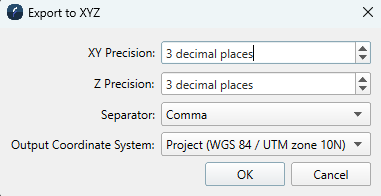
Exports the selected Line or Points object to an ASCII XYZ file. A dialog is presented with export options.
General Description
The dialog offers the following options:
-
XY Precision: Specify the decimal precision of the XY values,
-
Z Precision: Specify the decimal precision of Z values.
-
Separator: Specify the separator character between exported values.
-
Output Coordinate System: Specify either the object’s coordinate system or the project’s coordinate system for export.