
On this page:
Additional requirements for W8 and W8.1 to use certain features
-
To use touch, you need a tablet or a monitor that supports multitouch.
-
To access the Windows Store and to download and run apps, you need an active Internet connection and a screen resolution of at least 1024 x 768.
-
To snap apps, you need a screen resolution of at least 1366 x 768.
-
Internet access (ISP fees might apply)
W8 settings tips & tricks
When running Qinsy on a W8 OS please check the following settings:
-
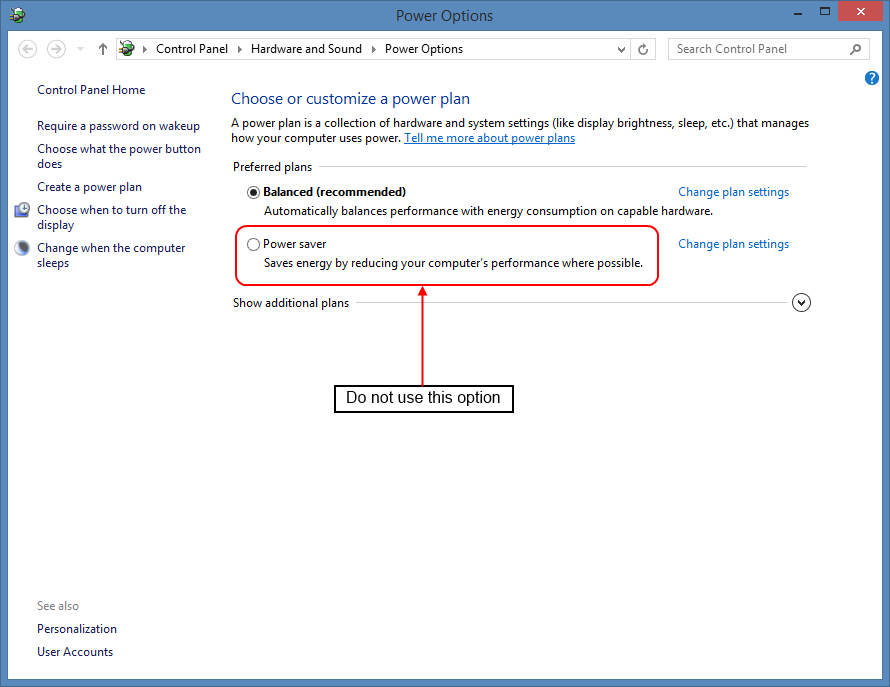
Power Options - "Balanced" or "High performance". When the option "Power saver" is used, there can be timing problems.
-
Run Qinsy (Console.exe) as Administrator (see screenshot below) in order to let Qinsy adjust the time for Time synchronization.
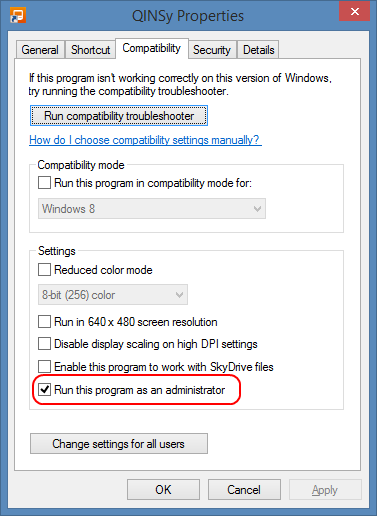
When the Console doesn't have Administrator rights, but the Survey Manager does, the Survey Manager won't start!
Make sure that the Parent program has a higher than or equal priority to the child program.