
Installer - EPSG database not updated to latest version
Problem
The problem is the EPSG database included in the Qimera 2.8.EarlyAccess installer will not update previous versions of the EPSG database during installation.
This problem occurs if you have Qimera 2.7.6, Qinsy 9.7.11, Fledermaus 8.7.2 or an earlier version installed.
Workaround
You will need to manually remove the old EPSG database and copy the new version 12.025 into the Geodetic Resources folder.
Optionally, in case you would like to keep the earlier version and update the EPSG database, you can do the following:
-
Close all QPS applications.
-
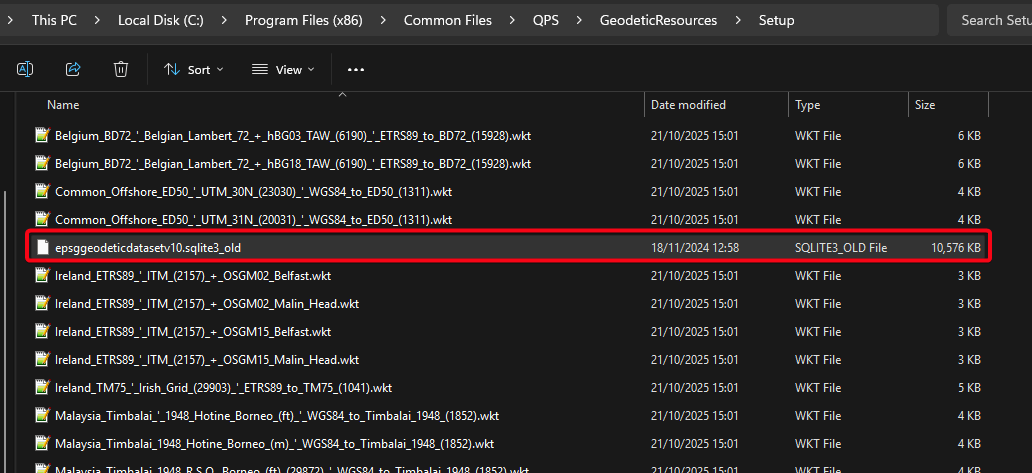
Rename the following file to the example shown in the picture:
-
File location:
C:\Program Files (x86)\Common Files\QPS\GeodeticResources\Setup -
Rename file:
epsggeodeticdatasetv10.sqlite3_old
-
-
Download and unzip the following file in your downloads folder:
-
Place that file into the following folder:
-
C:\Program Files (x86)\Common Files\QPS\GeodeticResources\Setup
-
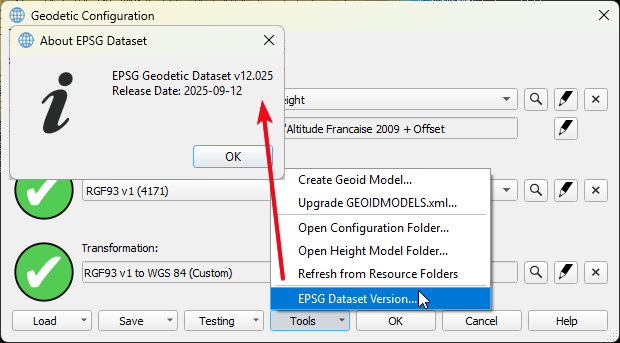
You can now check your EPSG database here in the Help > About menu or in the Geodectic Configuration:
Planned fix
This is planned to be fixed in Qimera 2.8.1.
Licensing - Opening older versions of Qimera may deactivate your license
There is a known issue with licensing in older versions of Qimera. An error would appear in the dialog “Failed to Activate License” with the message “There are network adapters on the system that are disabled, please enable them and try again.” when trying to activate the softlock license. In order to fix this issue, we’ve updated the licensing in Qimera 2.8.0 and License Manager 1.10.2.
This update may cause accidental license deactivation if you activate your license in Qimera 2.8.0 and then open an earlier 2.7.x version. The fix is to manually copy the DLLs (found in the link below) into that older version’s installation folder as noted in steps 1 and 2:
Older Known Issues
|
Issue |
Summary |
Affects Version/s |
Expected Fix Version |
|---|---|---|---|
|
Limitation |
Filter toolbars to "Accept All Soundings" and "Revert Manual Edits" do not have the intended effect when used in a Cooperative Cleaning project to override cleaning that was done manually in the Master project prior to creating the Cooperative Cleaning project. Suggested workflow is to use the manual re-accept tools in the Slice Editor and 3D Editor. |
2.1.0 |
2.8.x |
|
|
|
|
|