
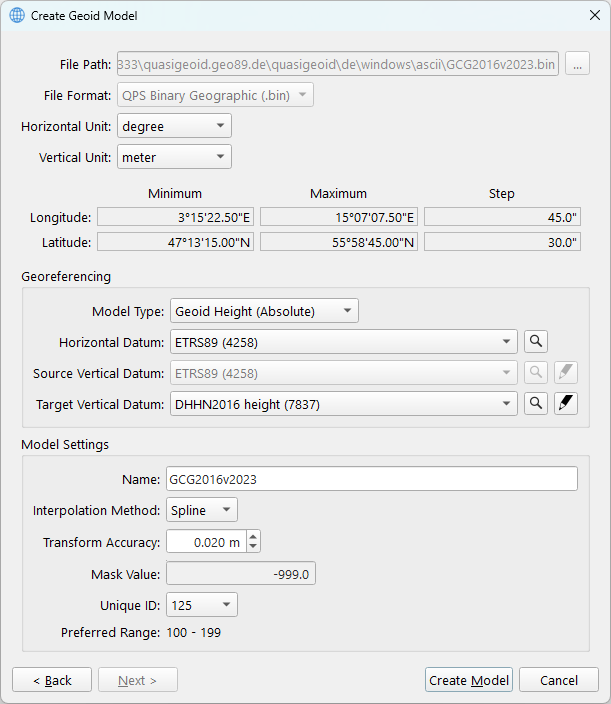
As the geoid model file alone contains insufficient geodetic information, it must be accompanied by a WKT file. By completing the fields in the dialog, it is possible to generate the necessary WKT file for use with the Geodetic User Interface. For detailed information regarding the fields, please refer to the table below the image.
Upon completing the configuration of the fields, click the ‘Create Model’ button to copy or convert the geoid model and save the WKT file to the default shared location.
(On Windows: Public Documents\QPS\Shared\Geo\Geoid)
|
Item |
Info |
|---|---|
|
File Path |
This is the path where the geoid model file is located |
|
File Format |
Shows you the file format |
|
Horizontal Unit |
For the Latitude and Longitude |
|
Vertical Unit |
For the separation values |
|
Model Type |
This shows you if a model is Absolute or Relative:
|
|
Horizontal Datum |
Select the datum on which the separation model was created.
|
|
Source Vertical Datum |
Relevant when dealing with a relative model
|
|
Target Vertical Datum |
Select the target vertical datum. This can be a model for which an EPSG code is defined. Optional to create a custom vertical datum.
|
|
Name |
The name of the model that will be shown in the Geodetic User Interface |
|
Interpolation Method |
|
|
Transform Accuracy |
A fixed accuracy can be defined |
|
Mask |
Dependent on the file format, fixed value or definable |
|
Unique ID |
Unique Model ID may not overlap with existing custom geoid models |