
Installer updates
For this release, we update some of the dependencies we need to install in order to run Qinsy to the latest version. The following page gives you an overview of the current dependencies:
Additionally, we deprecated the use of VBScripts.
QPD improvements
Resolution
The new QPD format allows us to store footprint data in a higher resolution (more decimals). Previously millimeter resolution was only supported to a range of 30 meters from the system. Millimeter resolution is now supported to a range of 300 meters from the system, with a smooth transition to coarser resolutions.
Systems
-
Motion - Add Simrad EM3000 R-P-H driver over Network (UDP)
-
Simulator - Save settings as xml file in the project instead of Registry
-
SVP - Save SVP to SVP folder rather than logfiles
Setup
-
Object - Rename Height Above Draft Reference to Height of CoG above Draft Reference
Online
-
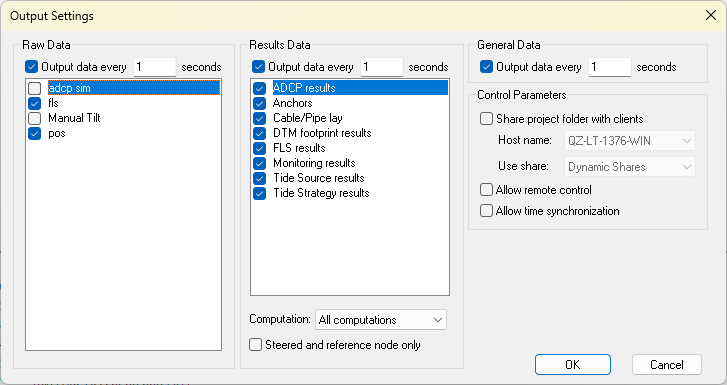
Display Server - Give user more control of what Raw and Result data is shared with remote display clients
-
Session Setup - Storage - FLS - Option to not store raw data (like WCD)
-
The default is not to store raw data.
-
-
Session Setup - Storage - SSS - Option to not store raw data (like WCD)
-
The default is to store raw data.
-
-
Session Setup - Storage - Static Grid - Import - Add support for manual import of QGUP
-
Session Setup - Storage - Static Grid - Import - Option to set date and time for imported grid data without a time information
-
Session Setup - Touchdown - Add Touchdown ID to QGFline attribute field.
-
Survey Log - Touch Down Mouse Event - In addition to vessel KP, add TDP KP in a separate column
Display
-
Alert - Nodes and Systems - Sort in alphabetical order
-
Profile - Adding Orientation "Perpendicular object heading" in Profile view (Dumptool)
-
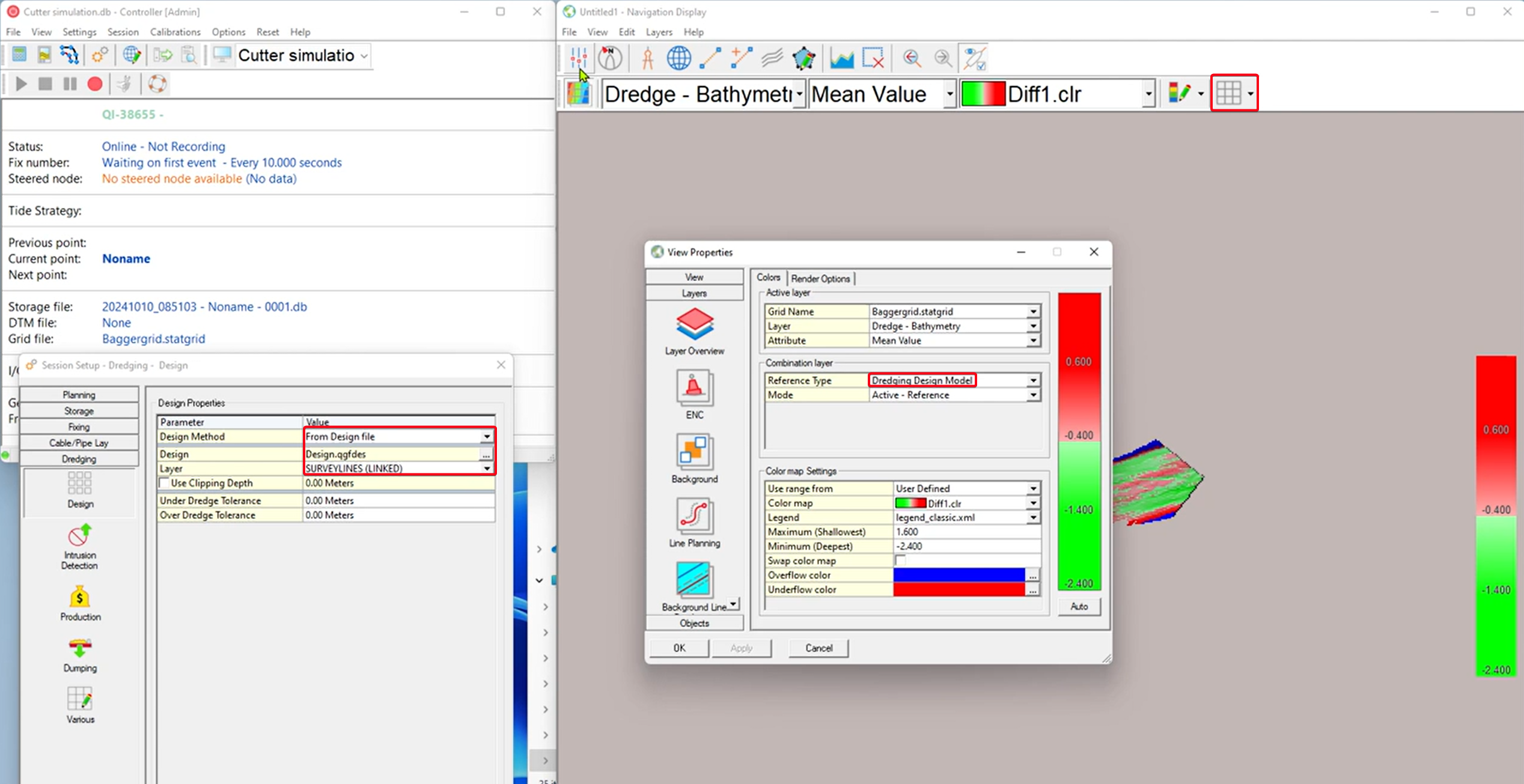
Profile - Terrain - Active Dredge design is added automatically for a new display
-
Profile - Terrain - Tide Strategy is added automatically for a new display
-
Profile - Terrain - Rename Water Level and Tide Strategy
-
Water Level → Water Level (Object)
-
Tide Strategy → Water Level (Strategies)
-
-
Timeplot - Add Sound Velocity observation from MBES ping
-
Navigation - Information Bar - Also show mean value for both layers when using the reference layer
-
Navigation - Make nodes in View properties in alphabetical order
-
Navigation - Quick profile - Use Grid layer setting for Line Color / Style / Width
-
Note that we saw a bug in this, which we are planning to get solved in 9.8.1.
-
-
Navigation - Static Grid - Add Reference type for Active Dredge design
-
Navigation - Range and bearing tool - Improve visibility of Range Circle and possibly outline
-
Navigation JS - Add support for Shade layer
Offline/Replay
-
Settings Cloner - Add support for monitors
Survey Manager
-
Dark Mode support
-
GeoTiff 32bit [DEM] - Added option to automatically import it into a static grid.
-
Grid - Export - Add Minecraft (GridQraft) Exporter
-
Profile - Draw Active profile on top in profile panel
-
Profile - Invert line color Black/White with the background color
-
Project Tree - Add option to collapse the whole tree
-
Plotting - Plan View - Use KP/Offset to position Plan View on active Line
-
Plotting - Rename template
-
Plotting - Template - Add option to lock location of plot elements
-
QGF - Import - Add message saying that the CAD objects don't have a name and allow user to automatically add them
-
QGF - Import/Export - Report transformation parameters
-
QGF - Line Planning - Cross lines - Add option for Target Layer and Overwrite
-
QPD - Support Applying QPD Edits file generated by Qimera
-
QPD - Maggy - Geosoft database (*.GDB) format - Add Signal Strength, Altitude and System Depth
-
Static Grid - Import - ASCII - Layout - Add QGUP format to import Grid
-
Static Grid - Spot Soundings - Update Form
-
Static Grid - Loading in Custom E/N Geoid Models is now possible again