
The QPS team is continuously improving Qinsy to implement new functionality and documentation.
Unfortunately, there are a number of known issues in our software release.
These software issues will be solved in future maintenance releases.
Online/Replay - DrvResultOut.exe crash
Problem
DrvRestultOut.exe, the process responsible for creating QPD and Grid files, crashes because memory usage keeps increasing during QPD creation.
For each Transducer ping update, metadata is kept in memory. So if you have a lot of updates and have been creating a QPD for a long time, the Memory usage increases until it crashes.
-
You can monitor this in Windows Task Manager.
Workaround
-
Online & Replay
You can close Qinsy and apply the following Patch: Qinsy.9.9.0.2.Component.DrvResultOut.zip
The ZIP file includes a ReadMe.txt explaining the exact steps to apply the patch. -
Online only
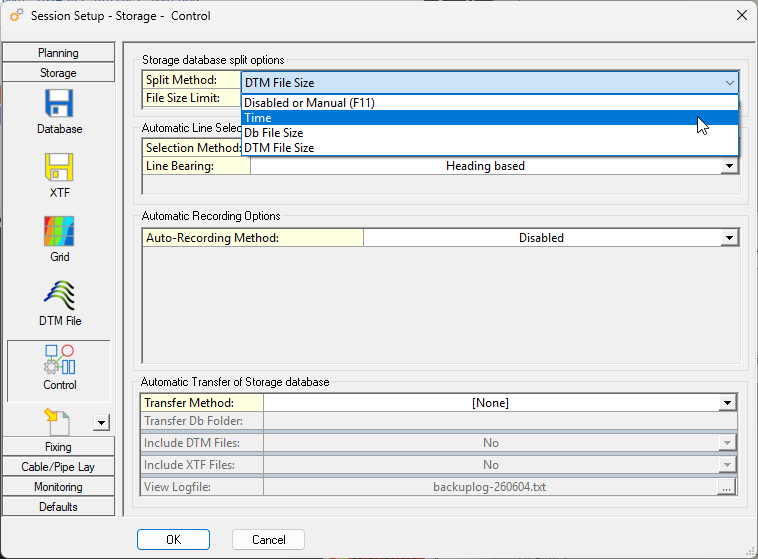
Enable file splitting in such a way that the split happens before the memory increases to much.-
Controller → Session Setup → Storage → Control:
-
-
Replay only
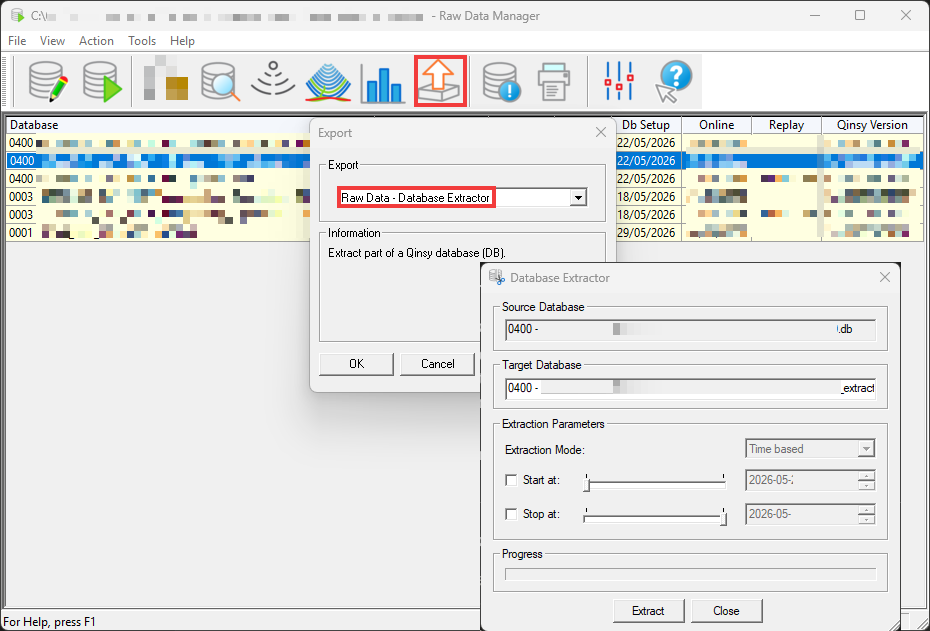
Replay might crash after a while, so splitting the recorded databases resolves this.
It can be quite some manual work.-
Replay → Export - Database Extractor
-
Planned fix
This will be addressed in Qinsy 9.9.1.
Display - Navigation - Does not open when the Display Server is running
Problem
There are two scenarios:
-
You are Online and open the Display Server. After that, you can no longer (re-)open a Navigation display.
-
On startup of the Controller, the Display Server is running. Then, no Navigation display will launch.
Workaround
We have a Patch available that you can apply: Qinsy-9.8.1-2026-02-12-Patch-SocketServer-.zip
Take the following steps for PCs running the Qinsy Server and Client:
-
Unzip the patch on your PC;
-
Close Qinsy completely.
-
Go to the Qinsy installation folder:
C:\Program Files (x86)\QPS\Qinsy\9.8.1 -
Rename the following:
-
SocketServer.exe → SocketServer.exe_original
-
ClientController.exe → ClientController.exe_original
-
-
Place the exe files from the patch in the installation folder;
-
Start using Qinsy.
Planned fix
The fix will be part of Qinsy 9.8.2.
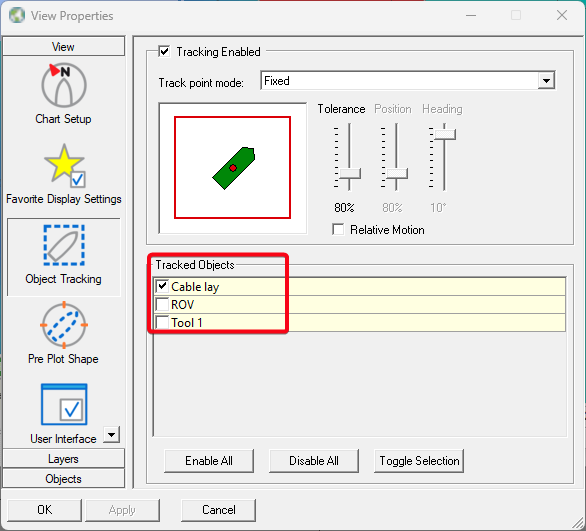
Display - Navigation - Object tracking settings not remembered
Problem
The following settings are not correctly stored.
So after restarting the display, other objects might be tracked then previously selected.
Workaround
No workaround.
Planned fix
This is planned to be fixed in Qinsy 9.8.2.
If you need a patch before that, please reach out to Support.
Installer - EPSG database not updated to the latest version
Problem
The problem is that the EPSG database, included in the installer, will not update previous versions of the EPSG database during installation.
This problem occurs if you have Qinsy 9.7.11 or an earlier version installed.
Workaround
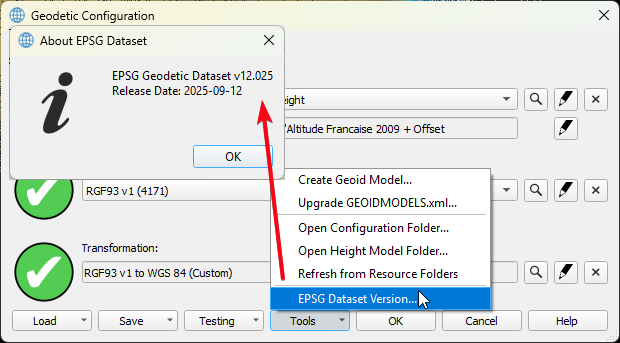
You will need to manually remove the old EPSG database and copy the new version 12.025 into the Geodetic Resources folder.
Optionally, in case you would like to keep the earlier version and update the EPSG database, you can do the following:
-
Close all QPS applications.
-
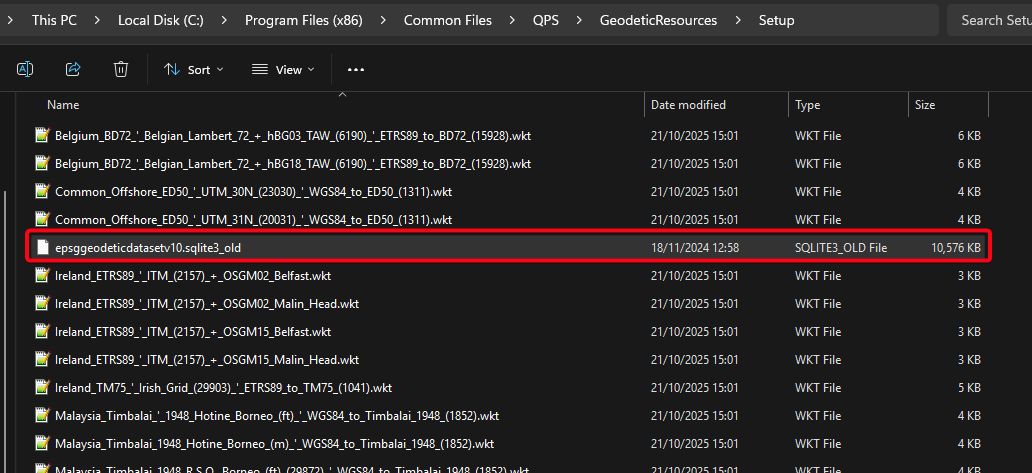
Rename the following file to the example shown in the picture:
-
File location:
C:\Program Files (x86)\Common Files\QPS\GeodeticResources\Setup -
Rename file:
epsggeodeticdatasetv10.sqlite3_old
-
-
Download and unzip the following file in your downloads folder:
-
Place that file into the following folder:
-
C:\Program Files (x86)\Common Files\QPS\GeodeticResources\Setup
-
You can now check your EPSG database here:
Planned fix
This is planned to be fixed in Qinsy 9.8.2.
Licensing
With this release, there is a new License Manager version 1.10.2.
The new License Manager fixes the issue where an error would appear in the dialog “Failed to Activate License” with the message “There are network adapters on the system that are disabled, please enable them and try again.” when trying to activate the softlock license. Older versions of Qimera may still experience this issue.
If you activate the license in Qinsy 9.8.0 and then open an earlier version, the softlock license may be lost.
The fix is to manually copy the DLLs into that older version:
Offline - Export - Database Extractor not working on older database files
Problem
The problem is that for older database files, created before 2023, the Database Extractor might nog work as expected. Some information records will not be extracted to the _extracted.db files.
This will result in a crash or freeze when the _extracted.db file is replayed.
Planned fix
This is planned to be fixed in Qinsy 9.8.2.