
Description
This driver is used to exchange information with the IHC IMS dredging computer as found on board Hopper/Cutter dredgers (TSHD/CSD).
The following input systems are supported:
-
USBL System
-
Pitch Roll & Heave Sensor
-
Gyro Compass
-
Tide Gauge
-
Miscellaneous System
-
Underwater Sensor
-
Dredging Sensor
-
Rotation Angle Sensor
The output system is capable of outputting a large number of parameters as specified in the message Format Description found below.
Driver Information
|
Driver |
Network - IHC Dredging Positions (Binary) |
Interface Type |
Network UDP |
Driver Class Type |
Terminated |
|---|---|---|---|---|---|
|
No |
Input / Output |
Input and Output |
Executable |
DrvOutIhcUdp.exe DREDGING_BINARY |
|
|
Related Systems |
|
||||
|
Related Pages |
|
||||
Database Setup
Cutter Suction Dredger
Set the IP broadcast range of the IHC dredging network and set up the correct port number. The default IP broadcast range is 172.16.255.255 and the default port is 2000.
The IHC computer which is Master will receive Position data from Qinsy and send out a response. The utility ComSwitch is installed on IHC computers and will perform the following functions: position data received from a Qinsy computer is transferred to the Master computer, the response from the Master computer is converted to a network broadcast so that multiple Qinsy computers can use the data.
It is possible that multiple Qinsy computers send Position data however the first that is received by IHC will be used and other computers are ignored. When the Position data is not received for 0.5 seconds then IHC will switch to the next available Qinsy computer. The time-out value of 0.5 seconds is a setting in ComSwitch.
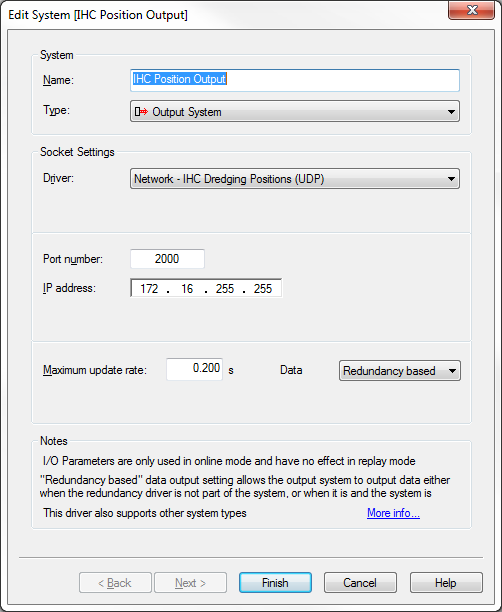
The following systems are usually added to a CSD setup:
|
System |
Description |
Observations |
Slot |
Factor |
Reference |
|---|---|---|---|---|---|
|
Output System |
Position Output |
|
|
|
|
|
Underwater sensor |
Draft Trunnion |
Trunnion |
Trunnion |
-1 |
|
|
Dredging Sensor |
IHC sensors 1 |
Density, Velocity |
Density,Velocity |
|
|
|
USBL System |
Cutpoint |
|
CutPoint |
Positive Upward |
|
|
USBL System |
Spud |
|
Spud |
|
|
|
Pitch Roll Heave Sensor |
Pontoon |
|
VruPontoon |
|
|
|
Pitch Roll Heave Sensor |
VRU Ladder |
|
VruLadder |
|
|
|
Underwater Sensor |
ROV depth |
ROV depth |
CutDepth |
-1 |
Chart Datum |
|
Miscellaneous System |
Spud Carrier |
|
Spud |
|
|
It is also possible to send triangles to the IHC computer. This is a different driver which uses TCP/IP for communication. The description can be found at: Network - IHC Dredging Triangles (TCP) - 15
Trailer Suction Hopper Dredger
Set the IP broadcast range of the IHC dredging network and set up the correct port number. The default IP broadcast range is 172.16.255.255 and the default port is 2000.
The IHC computer which is Master will receive Position data from Qinsy and send out a response. The utility ComSwitch is installed on IHC computers and will perform the following functions: position data received from a Qinsy computer is transferred to the Master computer, the response from the Master computer is converted to a network broadcast so that multiple Qinsy computers can use the data.
It is possible that multiple Qinsy computers send Position data however the first that is received by IHC will be used and other computers are ignored. When the Position data is not received for 0.5 seconds then IHC will switch to the next available Qinsy computer. The time-out value of 0.5 seconds is a setting in ComSwitch.
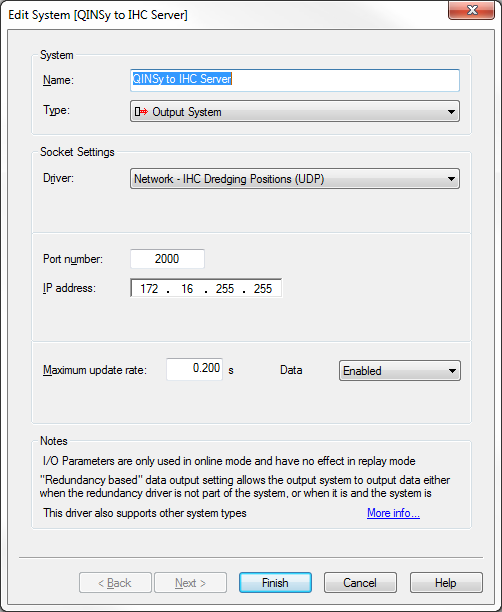
The following systems are usually added to a TSHD setup:
|
System |
Description |
Observations |
Slot |
Factor |
Reference |
|---|---|---|---|---|---|
|
Output System |
Position Output |
|
|
|
|
|
Underwater sensor |
Draft |
Draft Aft , Draft Fore |
DraftAft , DraftFore |
1 |
|
|
Dredging Sensor |
Dredge Status |
Status |
Status |
|
|
|
USBL System |
Port side |
|
UsblPort |
Positive Upward |
|
|
USBL System |
Starboard side |
|
UsblStbd |
Positive Upward |
|
|
Pitch Roll Heave Sensor |
IHC VRU |
|
VruHopper |
|
|
|
Underwater Sensor |
Depth SB |
ROV depth |
DepthStbd |
-1 |
Chart Datum |
|
Underwater Sensor |
Depth PS |
ROV depth |
DepthPort |
-1 |
Chart Datum |