
Description
These Generic Output drivers allow the user to output user definable ASCII strings from Qinsy.
In the Qinsy Console you can find the Generic Editor from the following icon:

With the Generic Editor the user can create and output a driver definition file which needs to be selected in the online Graphical User Interface (GUI):
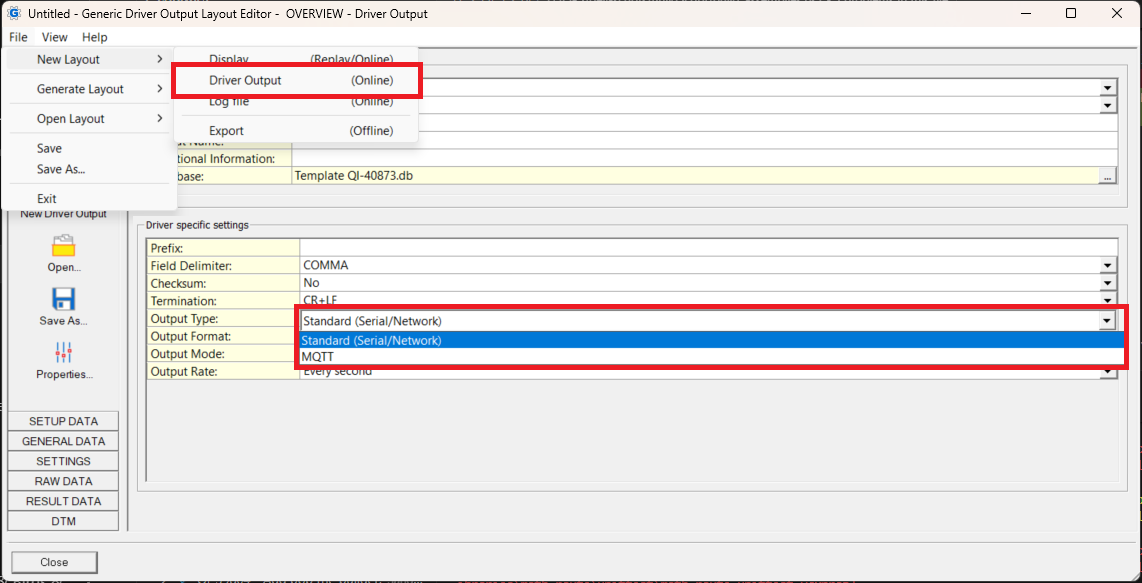
When Creating a generic MQTT Output Driver, the Output Type MQTT needs to be selected, otherwise Standard (Serial/Network) should be selected.
Driver Information
|
Driver |
Generic Output (User-defined ASCII) |
Interface Type |
Serial / UPD / TCP |
Driver Class Type |
Terminated |
|---|---|---|---|---|---|
|
No |
Input / Output |
Output |
Executable |
DrvOutGenericUI.exe |
|
|
Related Systems |
|
||||
|
Related Pages |
|||||

Database Setup
Select the driver that supports the required output interface:
|
Interface |
|
|---|---|
|
Serial |
|
|
Network UDP |
|
|
Network TCP |
|
|
Network MQTT |
-
Serial
-
Select the COM port to which you want to output. Make sure the settings comply with the settings of the destination serial port.
-
-
UPD
-
Define the UPD port on which you want to output
-
Define the IP Range you want to output
-
|
IP address |
Explanation |
|---|---|
|
255.255.255.255 |
Driver will broadcast the message to all PCs within the network |
|
10.0.0.255 |
Driver will broadcast to all PCs wich have an IP address that starts with 10.0.0.xxx |
|
10.0.0.102 |
Driver will broadcast to the PC with that particular IP address |
-
TCP
-
Define the port on which you want to output
-
Define the IP address of the client (target device / PC). Only the PC / device with that particular IP address is able to receive the data and needs to be using TCP.
-
-
MQTT
-
Enter the address of the MQTT Broker including the url schema (e.g.
mqtt://) the address/url (This could be an IP address, or a URL) and the Port (e.g.1883) together, e.g.mqtt://broker.emqx.io:1883 -
On the next page enter credentials (if configured in the MQTT broker)
-
A client Id. A suffix will be automatically generated based on the Qinsy dongle Id and the system Id to ensure a unique client Id
-
Enter a connection timeout and a keep alive timeout.
-
The keep alive timeout indicates the maximum time that should pass without communications between client and server. If no messages pass in this time, the client will ping the broker.
-
The connection timeout indicates the maximum time that the underlying library will wait for a connection before failing.
-
-
The layout Purpose needs to be driver
-
The output type needs to be MQTT
-
Online
-
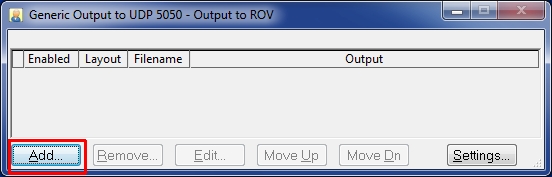
Select Add to add your output definitions (strings) or go to the next option which will allow you to create layouts while Online:
-
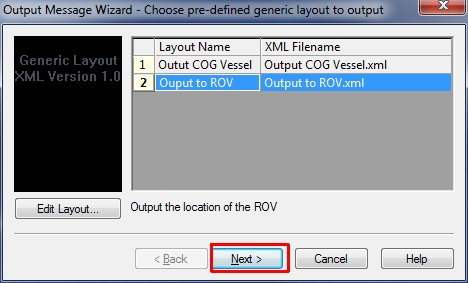
The already created output driver layouts will be shown:
-
Select one of the available layouts and select Next or select Edit Layout to start the Generic Layout Editor to
-
edit your layout
-
create a new layout
-
-
Select Next
-
-
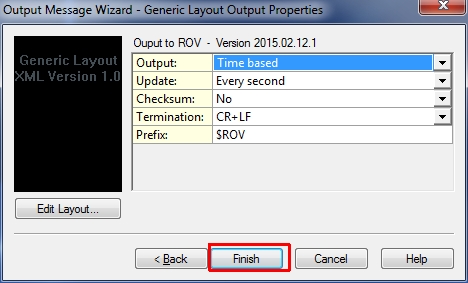
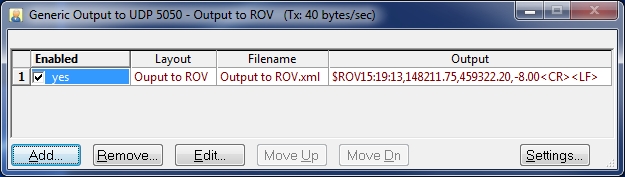
In this page you can still change a few settings which can be useful:
-
Here you can
-
Enable or disable the output of the added output driver layouts
-
View the resulting output string
-
Add more or remove output Layouts on the output port
-
Edit the selected output layout
-