
On this page:
License requirements
The MQTT functionality requires an Add-on on your license and is only available with:
-
Qinsy (9) Marine Construction
-
Qinsy (9) Offshore
If the add-on is not present and activated, the driver(s) will not be started when going Online.
Creating a driver configuration
-
Under Type: select 'Generic Input'
Press the 'New' button to create a new file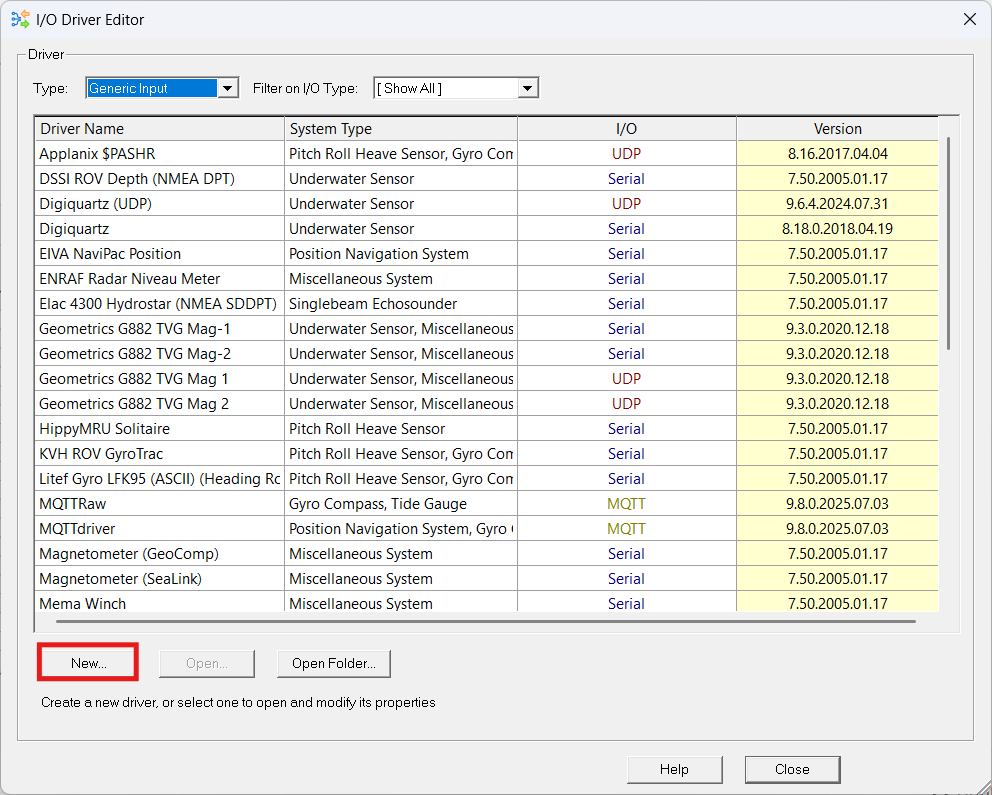
-
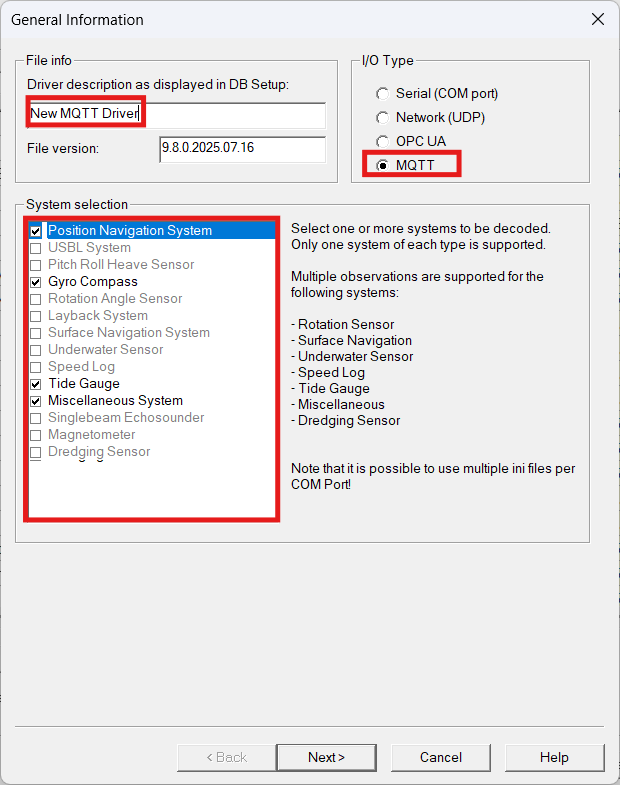
General Information
-
Enter a name
-
Select the MQTT option to create an MQTT Driver
-
Select the system types you want to decode
-
Press Next>
-
-
MQTT Parameters
-
Configure the connection to the MQTT broker and the topics that should be subscribed.
More information can be found here: Generic Input - MQTT Configuration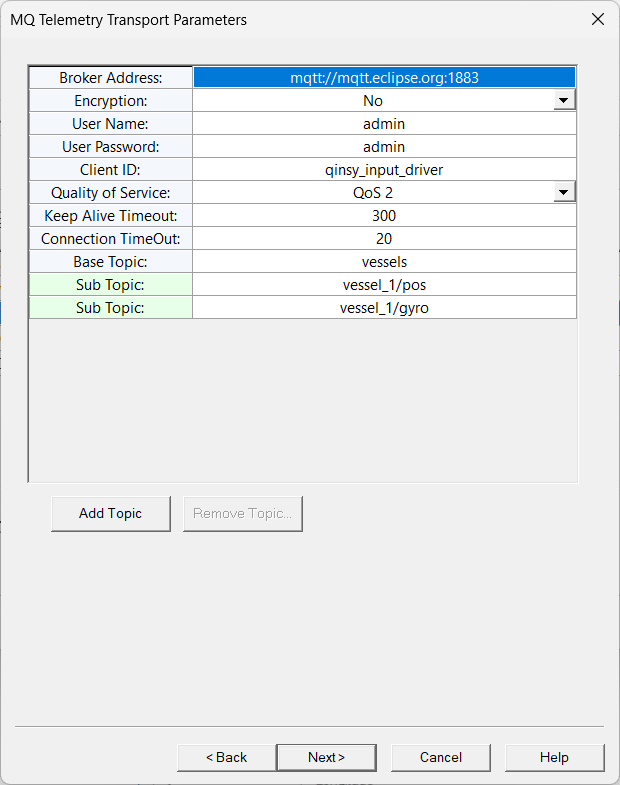
-
-
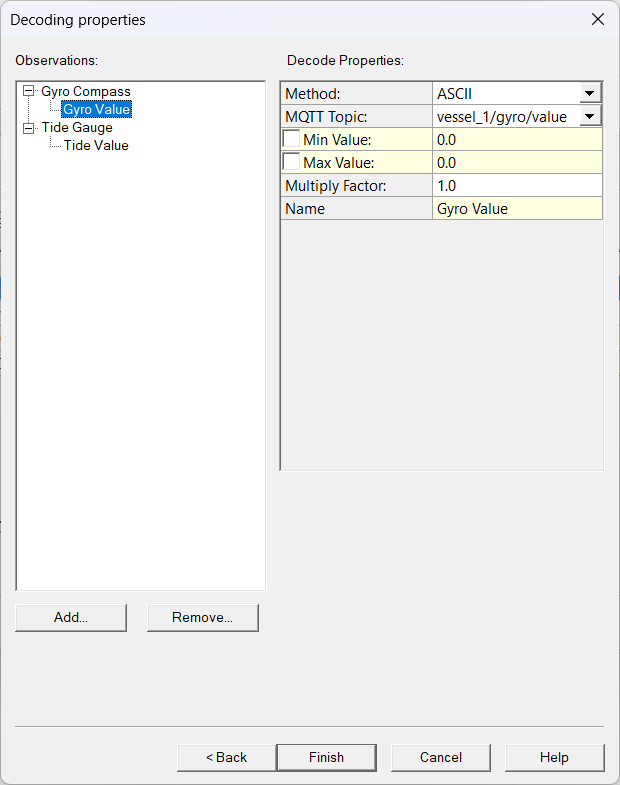
Set the Decoding Properties
-
Method: Currently, we support ASCII and JSON, in ASCII we expect a plain value when decoding.
-
MQTT Topic: The sub-topic that the data will be derived from
-
JSON Key: The key on which the specific observation is stored in the JSON when selecting JSON as the decoding method
-
Examples for a JSON Key
Core topic
The core topic is inserted between a Base Topic and Sub Topic.
Base Topic/Core Topic/Sub Topic

Or visualized differently:

Base Topic
    Core Topic
        Sub Topic
The Core topic can be defined in your template setup, as shown below:
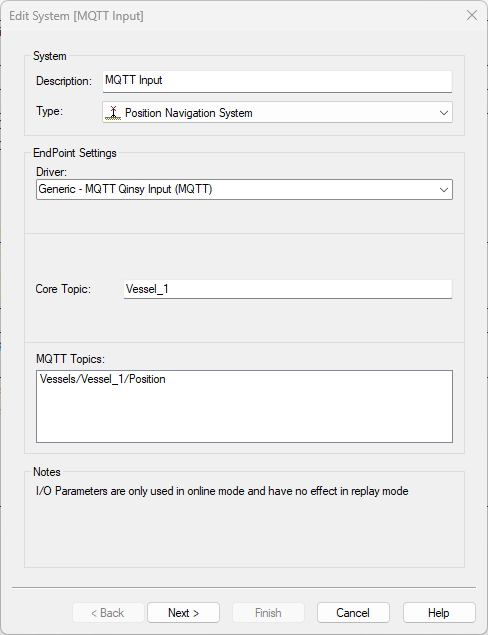
The reason to do this is in case you have similarly structured data coming from multiple vessels, for example.
The data could then look like this:
Vessels
  Vessel_1
      Position {
          "Node Result":{
            "Priority":{
              "Vessel 1 CoG":{
                "Latitude": "x.xx",
                "Longitude": "x.xx",
                "Height": "x.xx"}}}}
  Vessel_2
      Position {
          "Node Result":{
            "Priority":{
              "Vessel 1 CoG":{
                "Latitude": "x.xx",
                "Longitude": "x.xx",
                "Height": "x.xx"}}}}
  Vessel_3
      Position {
          "Node Result":{
            "Priority":{
              "Vessel 1 CoG":{
                "Latitude": "x.xx",
                "Longitude": "x.xx",
                "Height": "x.xx"}}}}
|
Item |
Values |
Notes |
|---|---|---|
|
Base Topic |
Vessels |
|
|
Core Topic |
Vessel_x |
For each vessel |
|
Sub-Topic |
Position |
|
|
JSON Key |
Node Result/Priority/Vessel 1 CoG/Latitude |
For Latitude |
|
JSON Key |
Node Result/Priority/Vessel 1 CoG/Longitude |
For Longitude |
|
JSON Key |
Node Result/Priority/Vessel 1 CoG/Height |
For Height |
The advantage is then that:
-
You don’t need to create a new MQTT input driver per vessel.
-
So you only need to enter the connection values ones.
-
-
There is only one connection to the MQTT broker.
Note that this separation is only available for the Input drivers. The output driver needs to be defined as a single topic.
Return to: How-to I/O Driver Editor