
Description
This is a driver for the Parker PDFX Series Mini Stepping Drive.
It sends the command "1GOTO(MAIN)" to the Controller when start recording is performed. It polls the driver every 0.1 second using the "1R(EP)" or "1R(PE)" command for the current reading of the angle decoder.
The latter command is sent if the the NEW version of the driver entry is chosen. This angle is decoded and made available to the rest of Qinsy.
See below for the software that was downloaded in the driver.
Driver Information
|
Driver |
Parker PDFX Stepping Drive |
Interface Type |
Serial |
Driver Class Type |
Terminated <LF> |
|---|---|---|---|---|---|
|
No |
Input / Output |
Input (two-way) |
Executable |
DrvParkerPDFX.exe |
|
|
Related Systems |
|
||||
|
Related Pages |
|
||||
Decoding Notes
Data is decoded and passed on unscaled.
System Configuration
See the following page for a list of the software that was uploaded to the PDFX driver:
1K
1CLEAR(ALL)
1START:
1DECLARE(MAIN)               ;Declare Programs
1DECLARE(DATUM)
1OFF                         ;switch motor off
1W(MR,4000)                  ;Set motor resolution
1W(MC,70)                    ;Set motor current
1W(MS,50)                    ;Set standby current
1W(ER,400)                   ;Set encoder resolution 20000/50
1W(DU,1)                     ;Set to operate in encoder steps
1HOME1(+,0,+5.00,100.00,3)   ;Set homing parameters
1LIMITS(3,1,0,200.0)         ;Disable limits
1ON                          ;Turn motor on
;1GOSUB(DATUM)
1MI                          ;Motion Incremental
1D20000                      ;Set distance for 360 degrees
1V1.00                       ;Velocity
1VS0.25
1A250.00
1AD300.00
;1LOOP(MAIN,0)
1END

1MAIN:                       ;Main program
;1R(EP)
1G                           ;Begin motion
1T0.50                       ;Pause when motion complete
1H                           ;Change direction
1END

1DATUM:                      ;Homing routine
1W(CQ,0)                     ;Set for continuous execution mode
1O(1XXXXXXX)                 ;Turn output 1 on
1GH                          ;Go home
1T0.20
1O(0XXXXXXX)                 ;Turn output 1 off
1T0.20
1O(1XXXXXXX)                 ;Turn output 1 on
1T1.00
1TR(IP,=,1)                  ;Wait until motion has ceased
1W(PA,0)                     ;Set position to Zero
1W(CQ,1)                     ;Turn off continuous execution
1END

1ARM1                        ;Run start program on power up
1SV
Notes:
-
If the movement that occurs every time when recording is performed, has to be changed, modify the "1main:" section of the program. Refer to the PDFX manual for available commands.
-
To start in a predefined position, execute the datum routine.
This can be done in the following way:-
Use a terminal program or, the Easi-tools to send the command "1GOTO(DATUM) to the drive.
-
Modify the above program. Uncomment the statement ";1GOSUB(DATUM)" (remove the ";" character). Now the motor will go to a predefined position every time the driver is powered on.
-
Interfacing Notes
The interface cable is a non-standard RS-232 two-way cable.
See the diagram below for wiring details. Communication parameters are 19200 or 9600, 8, None, 1.
Note that the echo switch must be ON.
|
DB-25 |
Sensor |
|
DB-9 |
COM |
|
DB-25 |
COM |
|---|---|---|---|---|---|---|---|
|
Pin 4 |
RXD |
----- |
Pin 3 |
TXD |
|
Pin 2 |
TXD |
|
Pin 5 |
TXD |
----- |
Pin 2 |
RXD |
|
Pin 3 |
RXD |
|
Pin 3 |
SG |
----- |
Pin 5 |
SG |
|
Pin 7 |
SG |
Database Setup
Add an angle observation with the following properties to the system:
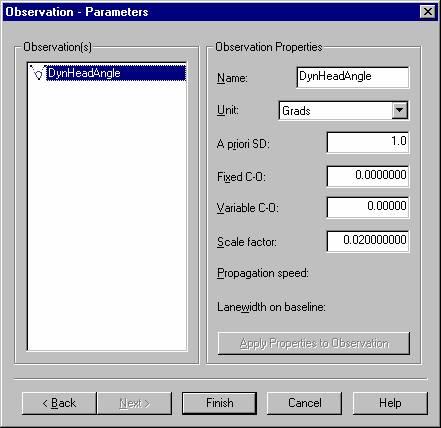
The scale factor is set up for a 20000 pulse per revolution encoder (400 / 20000 = 0.02).
Online
Controller Setup
The motor will start and perform the main routine when the record command is received.
Normally the main command will perform a single revolution, each time in an alternating direction.
This is subject to the software in the motor driver.
Drivers IO Notes
Type168
If this option is active then the driver will send the new "1R(PE)" command to ask for the current angle value.
This command is different depending on the Parker Controller type: the new 168 expects the "1R(PE)" command while the older type 167 expects "1R(EP)"