
For each line it is possible to see the History.
The history is stored in an XML file "Session.History.<Project Name>.xml" .
This XML can be found in the Project folder/Export/QMS.
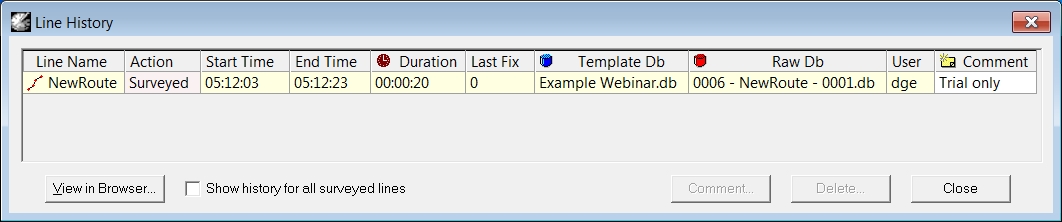
By default not all columns are enabled.
To enable or disable columns use the right mouse button in the history dialog and select Layout - Columns.
Tick the columns which should be visible.
All information is available in the XML file independent from the columns visible in the user interface.
|
Line History |
|
|---|---|
|
Line Name |
The name of the line on which the actions were carried out. The actions are stored on time. |
|
Action |
The actions carried out on the line. These are the same as the Status in the Planning dialog. |
|
Sequence |
This is the prefix number set on the Storage page of the Session Setup.
|
|
Start Date |
Start date of the survey. |
|
Start Time |
Start time of the survey. |
|
End Date |
End date of the survey. |
|
End Time |
End time of the survey. |
|
Duration |
The duration of the survey action in time. |
|
Distance |
At the beginning and at the end of each logging session the distance along and across the mainline is stored in the history XML.
|
|
Speed |
The speed is a calculated value based on the duration and the distance as mentioned above.
|
|
First Fix |
First fix number in the recorded database. |
|
Last Fix |
Last fix number in the recorded database. |
|
Start MP |
Meter Point along the selected mainline where recording started. Shown as 'Offsets' in the selection list. |
|
End MP |
Meter Point along the selected mainline where recording ended. Shown as 'Offsets' in the selection list. |
|
Start Offtrack |
Offtrack distance from the mainline at the start of the recording. Shown as 'Offsets' in the selection list. |
|
End Offtrack |
Offtrack distance from the mainline at the end of the recording. Shown as 'Offsets' in the selection list. |
|
Template Db |
Template database used to record the database.
|
|
Raw Db |
Database where the data is recorded. Shown as 'Storage Db' in the selection list. |
|
DTM |
DTM file created while recording or replaying the data. |
|
Sounding Grid |
Sounding grid file filled while recording or replaying the data. |
|
User |
Name of the user performing the action.
|
|
<View in Browser> |
All the data which is present in the *.xml file can be viewed with a browser program and could be adjusted there. |
|
Show history for all surveyed lines |
When activated, all Surveyed lines will be shown in this table. |
|
Comment |
It is possible to enter user defined comments for each item in the history.
|
|
<Delete> |
Delete an item from the history list.
|
|
<Close> |
Close the Line History overview. Settings will be saved for the next time. |
Return to: Line Databases
or
Return to: Line Planning