
Besides storing data to the Database it is also possible to store data on the fly to the XTF format.
Read more about XTF in the Knowledge Base document 'Howto Create XTF'.
Multiple XTF storage is necessary because XTF only allows storage for a limited number of sidescan and multibeam systems.
With storage of multiple simultaneous files this limitation can be overcome.
A warning for snippet/multibeam users:
When multiple XTFs are used it can happen that the amount of data becomes too large for your hard disc to handle.
This will lead to endless buffering of the driver, resulting in excessive memory usage and finally a crash.
Therefore make sure that you use state of the art hardware which is capable of such data transfer amounts.
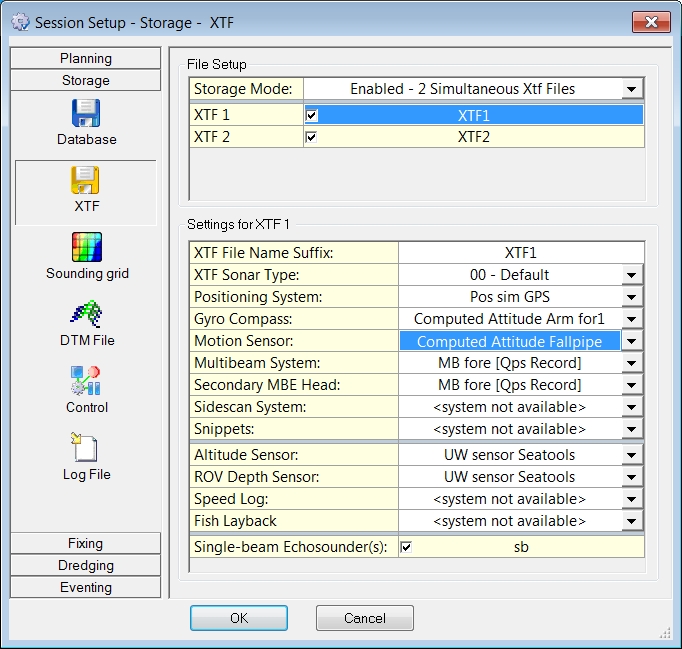
|
File Setup |
|
|---|---|
|
Storage Mode |
Select whether an XTF file needs to be created or not.
|
|
XTF 1
|
When 2 or more 'Simultaneous Xtf Files' have been enabled in the line Storage Mode, each file gets its own line and can be enabled here.
|
|
Settings for XTF n |
|
|
XTF File Name Suffix |
Only visible when two or more Simultaneous Xtf Files have been enabled in the File Setup pane above.
|
|
XTF Sonar Type |
Choose a type from the drop down list. |
|
Positioning System |
Choose the used system from the drop down list. |
|
Gyro Compass |
Choose a compass or a computation from the drop down list. |
|
Motion Sensor |
Choose a sensor or a computation from the drop down list. |
|
Multibeam System |
Select the used system from the drop down list.
|
|
Secondary MBE Head |
Select the used head from the drop down list.
|
|
Sidescan System |
Select the used sidescan system from the drop down list. |
|
Snippets |
Select the used multibeam system that produces the snippets from the drop down list. |
|
Altitude Sensor |
Select the used sensor from the drop down list. |
|
ROV Depth Sensor |
Select the used sensor from the drop down list. |
|
Speed Log |
Select the used sensor from the drop down list. |
|
Fish Layback |
Select the used sensor from the drop down list, if one will be used. |
|
Single-beam Echosounder(s) |
Activate the used system(s). Data is stored in QPS SBE records. |
|
Multi-Transducer System(s) |
Multiple systems can be selected. Data is stored in QPS MTX records. |
Return to: Storage